Linux SSL Certificate Guide (acme.sh & Certbot)
A beginner-friendly Linux guide to install, issue, deploy, verify, and renew free TLS certificates.
What this page does: it gives you exact Linux commands for your environment and explains each step so a first-time user can still get a working HTTPS certificate.
Scope: Linux servers only. This tool does not sign certificates for you. It helps you run trusted CA workflows (such as Let's Encrypt) on your own server.
1. Validation Method and Command Builder
| Method | Best For | Requirements | Wildcard Support |
|---|---|---|---|
| HTTP-01 (webroot) | Running Nginx/Apache site | Port 80 reachable, challenge path writable | No |
| HTTP-01 (standalone) | Short maintenance window | Port 80 free during issuance | No |
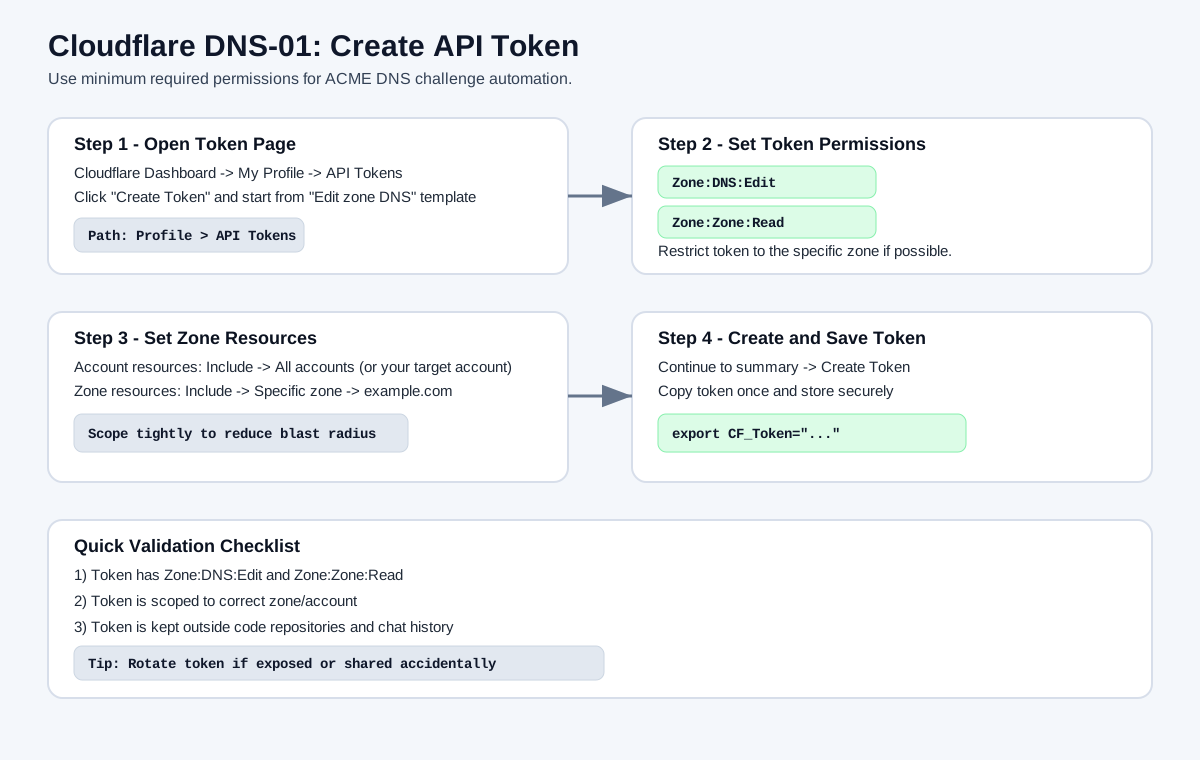
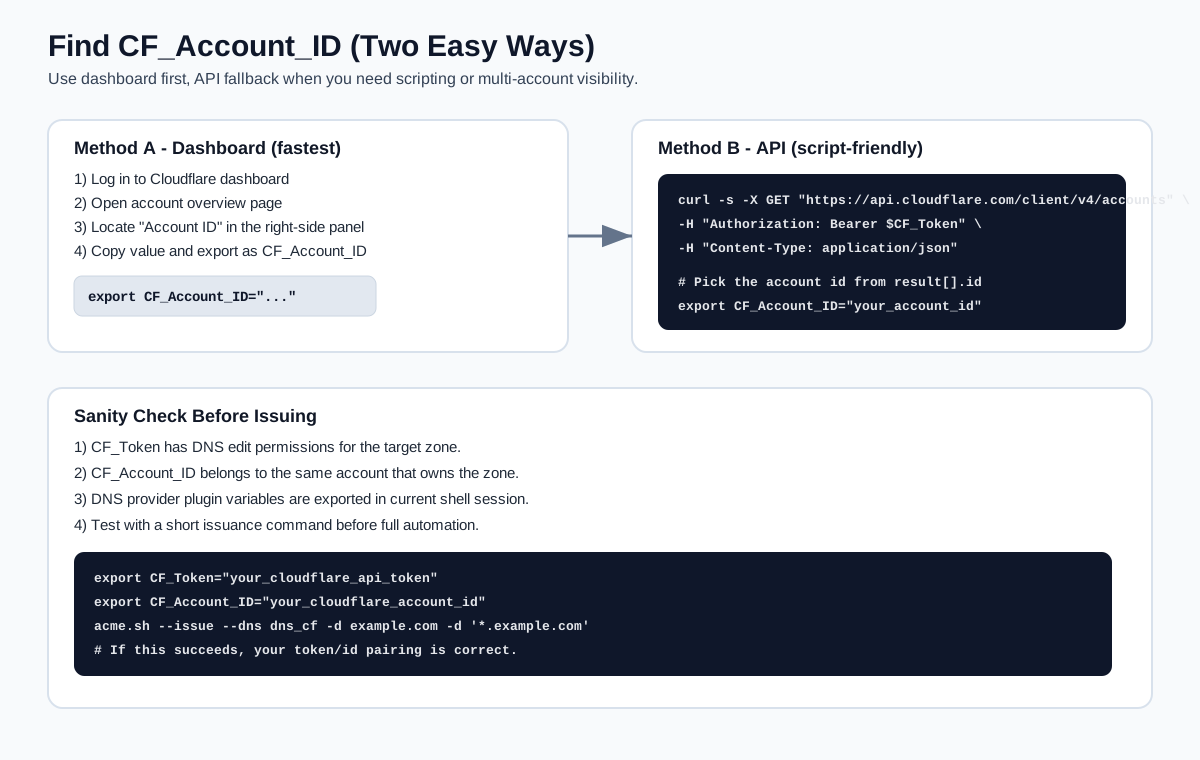
| DNS-01 | Wildcard certificates | DNS TXT update access (manual or API) | Yes |
Command Builder Inputs
Your method selection here controls prerequisites, commands, checks, and troubleshooting shown below.
Install Commands
Issue Commands
Deploy / Web Server Config Commands
Verification Commands
Renewal Commands
2. Prerequisites (auto by selected method)
- Domain resolution: your domain should point to your server public IP.
- Inbound ports: TCP
80must be reachable for HTTP-01 challenge (and usually443for HTTPS service). - Server access: SSH +
sudoon Linux. - System time: NTP/time sync should be healthy.
# HTTP-01: listener and firewall checks
sudo ss -tulpen | grep -E ':80|:443'

# Ubuntu/Debian (UFW)
sudo ufw allow 80/tcp
sudo ufw allow 443/tcp
sudo ufw status

# RHEL/CentOS/Rocky/Alma (firewalld)
sudo firewall-cmd --permanent --add-service=http
sudo firewall-cmd --permanent --add-service=https
sudo firewall-cmd --reload

# Time sync (all methods)
sudo timedatectl set-ntp true
timedatectl status
3. Tool Walkthrough (choose one path)
Select a tool in Step 1. This section will show only the matching walkthrough to avoid mixed instructions.
Path A: acme.sh
A1. Install dependencies
# Ubuntu / Debian
sudo apt update
sudo apt install -y curl socat cron openssl

# RHEL / CentOS / Rocky / Alma
sudo dnf install -y curl socat cronie openssl
sudo systemctl enable --now crond
A2. Install acme.sh
curl https://get.acme.sh | sh -s [email protected]
source ~/.bashrc
acme.sh --version
If command is not found, use ~/.acme.sh/acme.sh directly.
A3. Set Let's Encrypt as default CA
acme.sh --set-default-ca --server letsencrypt
acme.sh --showca
A4. Issue certificate
# Webroot mode
acme.sh --issue -d example.com -d www.example.com -w /var/www/html
A5. Install cert/key into stable paths
sudo mkdir -p /etc/ssl/toolforge/example.com

acme.sh --install-cert -d example.com \
--key-file       /etc/ssl/toolforge/example.com/privkey.pem \
--fullchain-file /etc/ssl/toolforge/example.com/fullchain.pem \
--reloadcmd      "sudo systemctl reload nginx"
# For Apache, replace reload command:
# --reloadcmd    "sudo systemctl reload apache2"   # Ubuntu/Debian
# --reloadcmd    "sudo systemctl reload httpd"     # RHEL
A6. Renewal checks
crontab -l | grep acme.sh
~/.acme.sh/acme.sh --cron --home ~/.acme.sh
~/.acme.sh/acme.sh --renew -d example.com --force
Path B: Certbot
B1. Install Certbot
# Ubuntu / Debian
sudo apt update
sudo apt install -y snapd
sudo snap install core
sudo snap refresh core
sudo snap install --classic certbot
sudo ln -sf /snap/bin/certbot /usr/local/bin/certbot
certbot --version

# RHEL / Rocky / Alma
sudo dnf install -y epel-release
sudo dnf install -y snapd
sudo systemctl enable --now snapd
sudo ln -sfn /var/lib/snapd/snap /snap
sudo snap install --classic certbot
sudo ln -sf /snap/bin/certbot /usr/local/bin/certbot
certbot --version
B2. Issue certificate
# Webroot mode
sudo certbot certonly --webroot -w /var/www/html -d example.com -d www.example.com
B3. Renewal checks
sudo certbot renew --dry-run
systemctl list-timers | grep certbot
sudo ls -l /etc/letsencrypt/renewal/
4. Post-Issuance Checks (method-aware)
# HTTP-01 / web deployment checks
# Check cert file dates on server (pick your path)
# certbot path:
sudo openssl x509 -in /etc/letsencrypt/live/example.com/fullchain.pem -noout -dates -issuer -subject
# acme.sh deployed path example:
sudo openssl x509 -in /etc/ssl/toolforge/example.com/fullchain.pem -noout -dates -issuer -subject

# Check live cert from outside
openssl s_client -connect example.com:443 -servername example.com < /dev/null 2>/dev/null | openssl x509 -noout -dates -issuer -subject

# Check redirect behavior
curl -I http://example.com
curl -I https://example.com
5. Common Errors and Fixes (method-aware)
| Error | Likely Cause | Fix |
|---|---|---|
Invalid response from /.well-known/acme-challenge |
Port 80 blocked, reverse proxy mismatch, wrong webroot | Open port 80, verify challenge URL path, confirm webroot for the same vhost |
Connection refused / timeout |
Firewall or security group blocks traffic | Allow inbound TCP 80/443 in both cloud and OS firewall |
NXDOMAIN or DNS validation failure |
DNS not propagated or wrong record value | Check with dig +short example.com and DNS TXT values |
| Renewal succeeded but old cert still served | Web server was not reloaded | Configure reload hook/deploy hook and retest |
| Wildcard issuance failed | Used HTTP challenge | Use DNS-01 challenge only for wildcard certificates |
Best Practices Checklist
- Use one canonical HTTPS host and redirect all variants.
- Protect private keys with restrictive permissions.
- Run
nginx -torapachectl configtestbefore reload. - Test renewal monthly even if automation is enabled.
- Never commit DNS API tokens to repositories.
References
Frequently Asked Questions
- Should I use acme.sh or Certbot on Linux?
- Both are valid. acme.sh is lightweight shell-based and flexible for custom deployments. Certbot is widely documented and convenient with nginx/apache plugins.
- What must be ready before issuing a certificate?
- Requirements depend on validation method. HTTP-01 needs DNS pointing to your server and reachable port 80. DNS-01 does not require A/AAAA pointing to your server, but does require control of
_acme-challengeTXT records. In all cases you need Linux sudo access and correct system time. - Can I issue wildcard certificates?
- Yes, but only through DNS-01 validation.
- How does automatic renewal work?
- acme.sh uses cron; Certbot uses cron or systemd timer. Always test with dry-run commands.
- Where should I store certificate files?
- Use stable paths under
/etc/sslor/etc/letsencrypt, with strict permissions. - Is this page Linux-only?
- Yes. Commands and service management examples are for Linux servers.
Related Guides
- Rocky Linux 9 / AlmaLinux 9 Nginx Install Guide
- Nginx Reverse Proxy Configuration Guide
- Rocky Linux 9 Docker Install Guide
- Linux Commands Cheat Sheet